
Polaris SDK Technical Reference
This document provides a detailed technical reference for the Polaris C++/JUCE SDK. It covers component architecture, core functionalities, API endpoints, and implementation examples.
SDK Components
License File (polaris.lic)
The SDK manages a polaris.lic file that stores the license state on the user's machine. Its key characteristics are:
- Location: The file is stored within a product-specific folder (
polaris/[product_slug]) inside the standard application support directory for the host operating system. - Generation: On its initial run, if no license file is present, the SDK generates a placeholder
.licfile containing essential device and product identifiers. - Format: The license file is a JSON object with a defined schema. The root of the object contains four key properties:
version,data,signed, andsignature. - Integrity: The
signedproperty is a Base64 representation of thedatablock. Thesignatureis generated by signing thesignedcontent with a private key, ensuring the license data cannot be tampered with. A public key is distributed with the SDK for offline signature verification. - Portability: The
datablock is left un-obfuscated within the JSON structure to allow developers to read license properties and integrate with their own legacy systems if needed. - Encryption: For on-disk security, the entire contents of the
.licfile are encrypted using a symmetric key. This allows the core signature keys to be rotated on the server without invalidating existing license files on client machines.
Example: Initial License File
Below is an example of a partial, unencrypted license file generated by the SDK upon its first check on a new machine.
{
    "version": 1,
    "data": {
        "created_date": "2026-06-04T19:37:19.093Z",
        "device_id":"3443444...",
        "product_id": "AQ987....",
        ...other properties
    }
}
Example: Activated License File
This example shows a full, unencrypted license file after a successful activation.
{
    "version": 1,
    "data": {
        "created_date": "2026-06-04T19:37:19.093Z",
        "device_id":"3443444...",
        "product_id": "AQ987....", // <-- product_id in future
        "license_tier":1,
        "license_key": "XXXX-XXXX-XXXX-XXXX",  // <-- future removal?
        "license_id": "G8IDO-...", // <-- future addition
        "status":"active",
        "activated_date":"2026-06-04T19:37:19.093Z",
        "expires":"2028-06-04T19:37:19.092Z",
        "refresh_date":"2026-07-04T19:37:19.092Z",
        "last_modified_date":"2026-06-04T19:37:19.093Z",
        "solana_tx": "5K8...abc"
        ...other properties
    },
    "signed": "eyJkZXZpY2...",
    "signature":"a34a99ec3..."
}
Signature and Encryption Workflow
The process of securing and verifying a license involves several steps across the server and client:
- Server: Serialize - The
dataobject is minified into a JSON string. - Server: Encode - The JSON string is encoded into a Base64 representation. This becomes the
signedpayload. - Server: Sign - The
signedpayload is hashed with SHA256 and signed with the private key to create the hexadecimalsignaturestring. - Client: Encrypt - If encryption is enabled, the complete license object (with all four properties) is symmetrically encrypted before being written to disk.
- Client: Decrypt - The file is read from disk and decrypted.
- Client: Verify Signature - The public key is used to validate that the
signaturecorresponds to thesignedpayload.
Integrating the SDK
The SDK is designed for flexibility, supporting both a fully interactive, UI-driven mode and a headless mode for custom integrations. All functionality revolves around a central Core object.
Initialization
To initialize the SDK, you must provide four key values. All code examples are demonstrative pseudo-code and not specific to one language.
Endpoint: The base URL for the Polaris Licensing API. For the beta, this ishttps://www.polaris-licensing.com/api/beta.api_key: Your secret API key, found in your Polaris account settings. This key must be kept secure and should not be exposed on the client-side.product_slug: The unique slug identifying your product, as configured in the Polaris dashboard. This will likely be replaced by aproduct_idin future versions.device_id: A unique, persistent identifier for the end-user's machine. The developer is responsible for generating this ID.
Core Instantiation
The Core object can be instantiated in two ways, depending on whether you want it to automatically perform an initial license check.
// Instantiate core and immediately run a license check.
const core = Core(endpoint, api_key, product_slug, device_id, true})

// Instantiate core without an initial check for manual control.
const core = Core(endpoint, api_key, product_slug, device_id, false})
Core Functions
The Core object exposes the following methods for license management:
/* Submit data to the /api/beta/license/{action} endpoint */
void submitData(String action,String rawData,function callback)

/* Check if license currently stored is valid - will create a psuedo license */
File getLicenseFile()

/* Gets the contents from a license file */
String getLicenseFileContents(bool encrypted)

/* Save a license file with the payload of your choice. */
void saveLicense(String payload, bool encrypted)

/*
   Check if license currently stored is valid - will create a psuedo license
   it calls getLicenseFile().  This runs by default when passing true to core.
*/
bool hasValidLicense()

/* Checks the signature for a payload or the stored license */
bool hasValidSignature(String signedContentPayload, String companionSignature)

/* Export an license (full or partial) for use @ polaris */
bool exportLicenseToDirectory (File& destinationDirectory)

/* Import a license file */
bool importLicenseFromFile (File& sourceLicenseFile)

/* Online heartbeat check for polaris i.e. is user online */
checkOnlineStatusAsync (function callback)

/*
    Once initialised this can be used to get the current license tier
    Designed for safe thread use so can be used to enable or disable
    product features - default = 0 i.e. no license with other higher values being
    decided at activation time and possible per license.
*/
int getLicenseTierSafe()

/* Thread safe way to grab the current days overdue for license checkin */
int getDaysOverdueSafe()
UI Components & Callbacks
For developers who want a pre-built user interface, the SDK provides two helper components:
DialogComponent: A ready-to-use modal dialog that wraps theWebComponentfor a complete interactive activation flow.WebComponent: A lower-level component that can be embedded into a custom UI. Both components can have their width and height specified.- Both components accept two callbacks:
onFlowCompleteandonCancelRequested. The web content will trigger the appropriate callback via the native bridge. - The
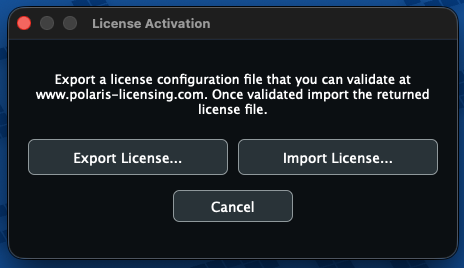
DialogComponentalso includes asetOfflineText(string)function to customize the text shown in the offline import/export dialog.
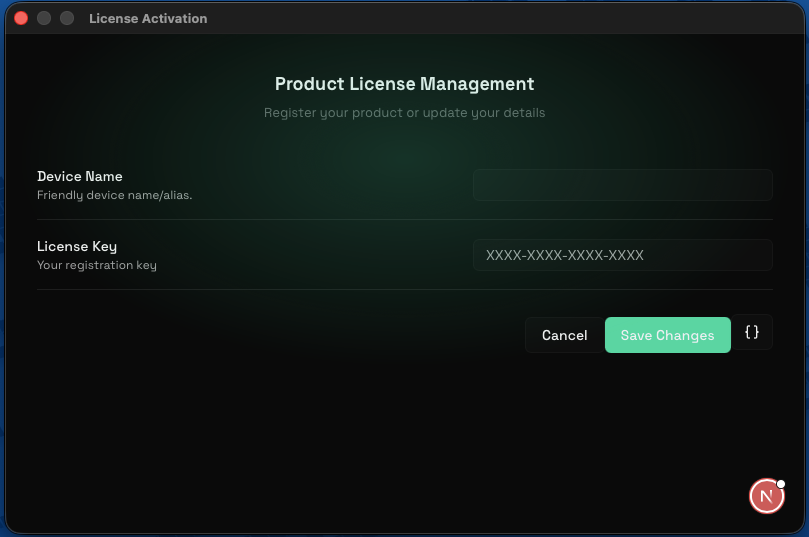
If you implement a custom UI for license input, be aware that all form data is validated server-side. Errors will be returned in an errors array.
{
    "error": "validation_failed",
    "errors": [
        { "property": "license_key", "message": "License key must follow format XXXX-XXXX-XXXX-XXXX" },
        { "property": "device_id", "message": "Device identifier cannot be blank" }
    ]
}
Implementation Examples
The SDK is currently a work in progress. A demo JUCE application will be released on GitHub to demonstrate three primary usage scenarios:
- Interactive Mode: Using
getLicenseTierSafe()andgetDaysOverdueSafe()to trigger the UI. - Headless Mode: Using a local license file for verification.
- Headless Mode: Operating without a local license file, relying solely on API calls.
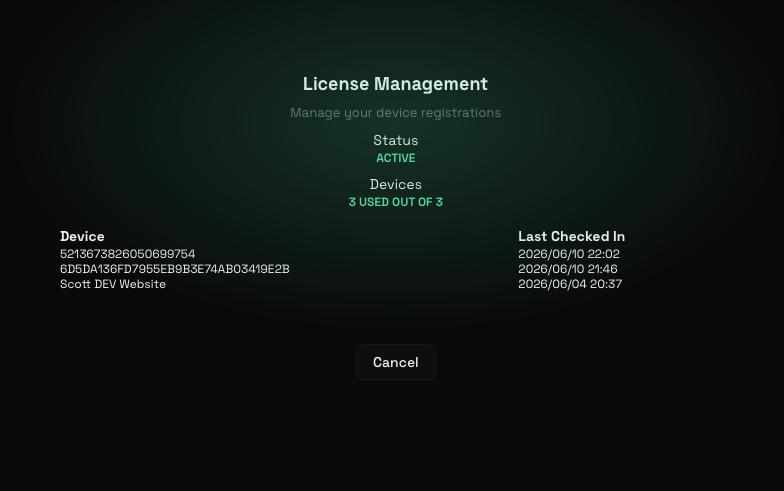
When the interactive dialog is launched with a valid license, it will display a summary of the license status and all registered devices. In the future, the content of this view will be configurable at the product level, with the potential to redirect to a custom URL.
Example: CMake Integration
# =================================================================
# POLARIS LICENSING SDK CROSS-PLATFORM INTEGRATION
# =================================================================

# 1. Safely resolve the absolute path to your module directory
get_filename_component(POLARIS_SDK_DIR "${CMAKE_CURRENT_SOURCE_DIR}/../polaris_licensing_sdk" ABSOLUTE)
get_filename_component(POLARIS_SEARCH_PARENT "${POLARIS_SDK_DIR}/.." ABSOLUTE)

target_include_directories(WebDialogDemo PRIVATE
    "${POLARIS_SEARCH_PARENT}"
    "${POLARIS_SDK_DIR}"
)

# 2. Tell JUCE where the module headers live
juce_add_module("${POLARIS_SDK_DIR}")

# 3. Expose the parent path to the compiler (prevents C1083 header errors)
get_filename_component(POLARIS_SEARCH_PARENT "${POLARIS_SDK_DIR}/.." ABSOLUTE)
target_include_directories(WebDialogDemo PRIVATE "${POLARIS_SEARCH_PARENT}")

# 4. Link the JUCE modules AND the precompiled binaries dynamically
if(APPLE)
    # macOS: Link the .a file and Safari framework
    target_link_libraries(WebDialogDemo PRIVATE
        juce::juce_gui_extra
        polaris_licensing_sdk
        "${POLARIS_SDK_DIR}/lib/MacOSX/libpolaris_licensing_sdk.a"
        "-framework WebKit"
    )

elseif(WIN32)
    # Windows: Link the .lib file dynamically based on Debug/Release
    target_link_libraries(WebDialogDemo PRIVATE
        juce::juce_gui_extra
        polaris_licensing_sdk
        $<$<CONFIG:Debug>:"${POLARIS_SDK_DIR}/lib/VisualStudio2022/x64/MDd/polaris_licensing_sdk">
        $<$<CONFIG:Release>:"${POLARIS_SDK_DIR}/lib/VisualStudio2022/x64/MD/polaris_licensing_sdk">
    )

    # Required for Windows native web components
    target_compile_definitions(WebDialogDemo PRIVATE JUCE_USE_WIN_WEBVIEW2=1)
endif()

# 3. Link the necessary JUCE modules
target_link_libraries(WebDialogDemo PRIVATE
    polaris_licensing_sdk
    juce::juce_gui_extra
    juce::juce_gui_basics
    juce::juce_graphics
    juce::juce_events
    juce::juce_cryptography
    juce::juce_core
    juce::juce_audio_basics
    juce::juce_audio_devices
    juce::juce_audio_utils
)

target_compile_definitions(WebDialogDemo PRIVATE
    # These unlock the actual code inside the juce_gui_extra headers
    JUCE_WEB_BROWSER=1
    JUCE_WEB_BROWSER_NATIVE_INTEGRATION=1
)WebView2Loader.dll alongside your JUCE plugin or application. This loader DLL is required by JUCE's native WebView2 component to initialize Microsoft Edge (Chromium). Without it, initialization will fail, causing the web view to fallback to the legacy Internet Explorer 11 engine, which does not support modern web features and will prevent the licensing flow from rendering correctly.Note: This requirement may change in a future SDK release as we are planning to statically embed the loader directly inside the Polaris library.
Example: JUCE License Check (Headless)
void runLocalLicenseCheckTest(const juce::String& endpoint, const juce::String& slug, const juce::String& api_key, const juce::String& device_id)
    {
        DBG ("========================================================");
        DBG ("POLARIS SDK: Initializing Manual License Check Test...");
        DBG ("========================================================");

        auto core = std::make_shared<polaris_licensing_sdk::Core> (
            endpoint,
            api_key,
            slug,
            device_id,
            false // set autoInit to false so we can step through manually
        );

        juce::File expectedLicenseFile = core->getLicenseFile();
        DBG ("Polaris SDK Test: Expected license file target destination is:");
        DBG (expectedLicenseFile.getFullPathName());

        if (core->hasValidLicense())
        {
            DBG ("Polaris SDK Test result: A valid license is ALREADY active on this machine.");
        }
        else
        {
            DBG ("Polaris SDK Test result: No valid license found.");
        }

        DBG ("License Contents: " + core->getLicenseFileContents());

        DBG ("Days Overdue (Safe Check): " + (juce::String) core->getDaysOverdueSafe());
        DBG ("License Tier (Safe Check): " + (juce::String) core->getLicenseTierSafe());

        DBG ("========================================================");

        juce::JUCEApplicationBase::quit();

     }
Example: JUCE Interactive Flow
In this mode, the SDK first attempts to contact a heartbeat service. If the API is unreachable, the dialog automatically transitions to an offline mode. This mode allows the user to export a file for manual activation on the Polaris website. In a real-world application, you would typically check if getLicenseTierSafe() < 1 before showing the dialog.
void runLicenseTestInteractive(const juce::String& endpoint, const juce::String& slug, const juce::String& api_key, const juce::String& device_id) {

        DBG ("========================================================");
        DBG ("POLARIS SDK: Initializing License Test Interactive ...");
        DBG ("========================================================");

        auto core = std::make_shared<polaris_licensing_sdk::Core> (
            endpoint,
            api_key,
            slug,
            device_id,
            true // Automatic initialisation
        );

        DBG ("Days Overdue (Safe Check): " + (juce::String) core->getDaysOverdueSafe());
        DBG ("License Tier (Safe Check): " + (juce::String) core->getLicenseTierSafe());

        licenseDialog = nullptr;

        licenseDialog = std::make_unique<polaris_licensing_sdk::DialogComponent>(core,800,500);

        licenseDialog->onFlowComplete = this {

            DBG("Payload from licensing SDK: " + jsonPayload);
            licenseDialog = nullptr;

            // Check the payload and decide what you wish to do.  Payload response may be determined
            // by your polaris product options.
            juce::JUCEApplicationBase::quit();
        };

        licenseDialog->onCancelRequested = this {
            DBG("Cancel signal from licensing SDK!");
            licenseDialog = nullptr;

            // User cancelled the licensing process - decide what you want to do.
            juce::JUCEApplicationBase::quit();
        };

        DBG ("========================================================");

        licenseDialog->showModal();

    }
API Endpoints
All API endpoints return a standard JSON object in case of an error, though the HTTP status code may vary.
{
    "error" : "error_message",
    "errors" : [] // <-- optional array of validation errors
}
Product Endpoints
API keys can be created at either the account level (granting access to all products) or at the individual product level.
POST /api/beta/licensing
This endpoint is used to activate a license key or perform a subsequent check-in. It can be used in interactive or headless mode.
curl -X POST  /api/beta/licensing?interactive={true|false}&redirect=juce \
-H "Authorization: Bearer YOUR_API_KEY" \
-H "Content-Type: application/json" \
-d '{
    “version” : 1,
    “data”: {
        “device_id": "unique-device-identifier",
        "product_id": "your-product-id”,
        "license_key": "your-license-key" <--- optional in interactive mode
        …your_other_mandatory_props_in_headless_mode
    }
 }'
Note that license_key is required for all headless (interactive=false) requests. It is the developer's responsibility to capture this key via their own UI. This operation is recorded as a transaction, except when a user cancels the interactive flow.
Response Behavior
If interactive=true, the server responds with a 307 Redirect to the licensing UI. Once the flow is complete, the final response data is delivered to the client via the specified redirect mechanism (e.g., the JUCE webview bridge to the onFlowComplete or onCancelRequested callbacks).
Example Success Response (Headless)
{
    "version": 1,
    "data": {
        "created_date": "2026-06-04T19:37:19.093Z",
        "device_id":"3443444...",
        "product_id": "your-product-id",
        "license_tier":1,
        "status":"active",
        "activated_date":"2026-06-04T19:37:19.093Z",
        "expires":"2028-06-04T19:37:19.092Z",
        "refresh_date":"2026-07-04T19:37:19.092Z",
        "last_modified_date":"2026-06-04T19:37:19.093Z",
        "solana_tx": "5K8...abc"
        ...other properties
    },
    "signed": "eyJkZXZpY2...",
    "signature":"a34a99ec3..."
}
Example Failure or Cancel Response (Headless)
{
    "error": "cancelled"
}
Interactive Dialog Examples
Registration
Valid License View
Offline Mode
POST /api/beta/licensing/[license_key]
This endpoint provides a summary of all registered devices for a given license key. In the future, the license_key path parameter will likely be replaced by a license_id, which is delivered in the license file payload. The product_slug will also likely be replaced by product_id.
curl -X POST /api/beta/licensing/XXXX-XXXX-XXXX-XXXX \
-H "Authorization: Bearer YOUR_API_KEY" \
-H "Content-Type: application/json" \
-d '{
    “version” : 1,
    “data”: {
        "product_id": "your-product-id”
    }
 }'
Use this endpoint to get a summary of a license's scope. Note that a license key must have been activated at least once for this endpoint to return data. This operation is not recorded as a transaction.
Example Response
{
    "key": "XXXX-XXXX-XXXX-XXXX",
    "product": "your-product",
    "status": "active",
    "activations": 1,
    "max_activations": 3,
    "solana_tx": "5K8...abc",
    "devices": [
        {
            "device_id":"3443444...",
            "checkin_date":"2026-06-04T15:45:11.483725+00:00",
            "last_checkin_date":"2026-06-04T19:37:21.077415+00:00"
        }
    ]
}